ServerlessNabaztag
ServerlessNabaztag is a firmware allowing control of the Nabaztag/tag directly via the web, without an external server (a web server is needed only for downloading the firmware and the mp3s).
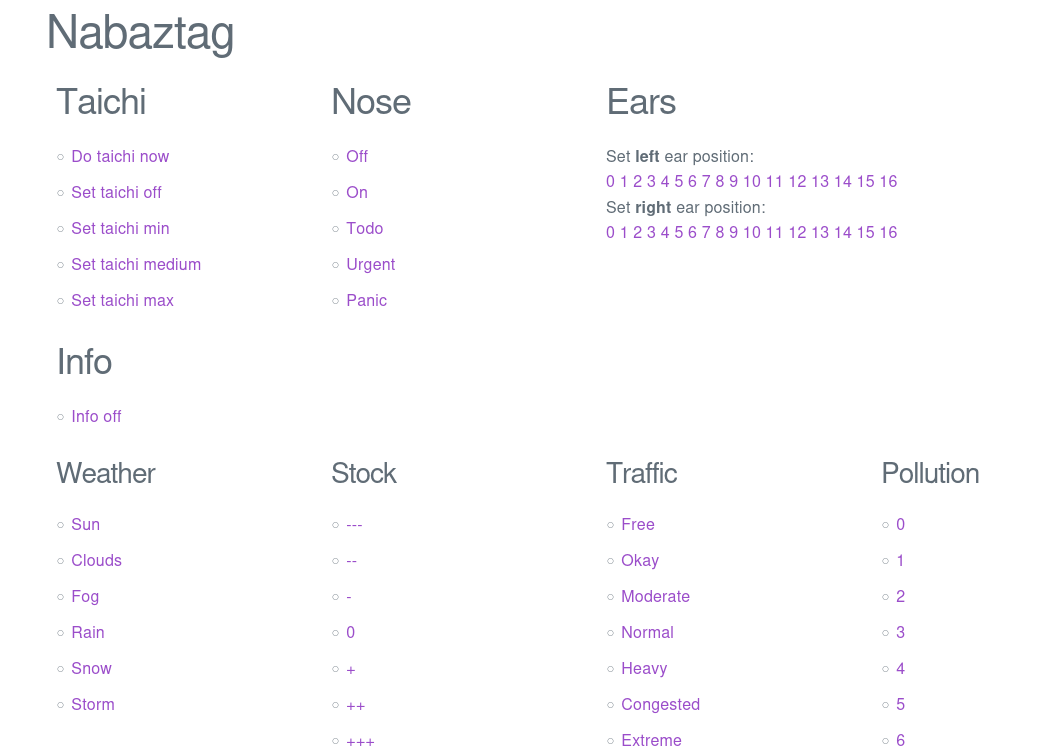
With this firmware, you can connect at http://<YOURNABAZTAGIP>/ and completely control your rabbit with a very simple web interface, as show in the following screenshot:
The OpenAPI specification is available ad http://<YOURNABAZTAGIP>/openapi.json and the swagger UI at http://andreax79.github.io/ServerlessNabaztag/vl/api/
All the commands can be called with a single HTTP requests from an external program/script, example:
$ curl http://nabaztag/wakeup
In examples/check_mail.py, there is a script that turns on the nose when you have unread email and changes the lights color according to the weather forecast.
Configure the rabbit
- Unplug the rabbit, press the button on its head and hold it while you replug your rabbit. When all the lights are blue, you can release the button
- On your computer, connect to the wifi network created by your rabbit (the name should be Nabaztag<XX>)
- Go to the configuration page at the following address: http://192.168.0.1
- At the bottom of the page, in General Info, change “Violet Platform” to andreax79.github.io/ServerlessNabaztag/vl (without http://)
- Click on Update settings and wait for rabbit to reboot.
- You can now connect to the IP of your rabbit, configure and control it. (note: if your rabbit IP is assigned with DHCP, you have to discover the IP address. Usually you can check the assigned IP from some page on your router)
Install on your web server (HTTP only)
- Copy all the content from the “vl” folder on this repository to your web server in a folder named “vl”
- Unplug the rabbit, press the button on its head and hold it while you replug your rabbit. When all the lights are blue, you can release the button
- On your computer, connect to the wifi network created by your rabbit (the name should be Nabaztag<XX>)
- Go to the configuration page at the following address: http://192.168.0.1
- At the bottom of the page, in General Info, change “Violet Platform” to the url of the vl directory (without http://, example: 192.168.0.1/vl)
- Click on Update settings and wait for rabbit to reboot.
- You can now connect to the IP of your rabbit, configure and control it. (note: if your rabbit IP is assigned with DHCP, you have to discover the IP address. Usually you can check the assigned IP from some page on your router)
Firmware features
- Control the rabbit via HTTP API
- Configure via web interface
- Fetch the current time from NTP and play the corresponding sound every hour
- Fetch weather from open-meteo
- Autonomously wake up at go to sleep
- Respond to ICMP pings
Development
Please install the following dependencies:
$ sudo apt-get install gcc-multilib g++-multilib
Build the compiler and the simulator:
$ make compiler
Build the firmware
$ make firmware
Start a local web server on port 80 (you need root for this):
$ sudo python3 -m http.server 80
or start local web server on port 8000 and redirect port 80 to 8000 (you need root for the iptables command):
$ sudo iptables -t nat -I PREROUTING -p tcp --dport 80 -j REDIRECT --to-ports 8000
$ python3 -m http.server