ServerlessNabaztag
ServerlessNabaztag is a firmware allowing control of the Nabaztag/tag directly via the web, without an external server (a web server is needed only for downloading the firmware and resources).
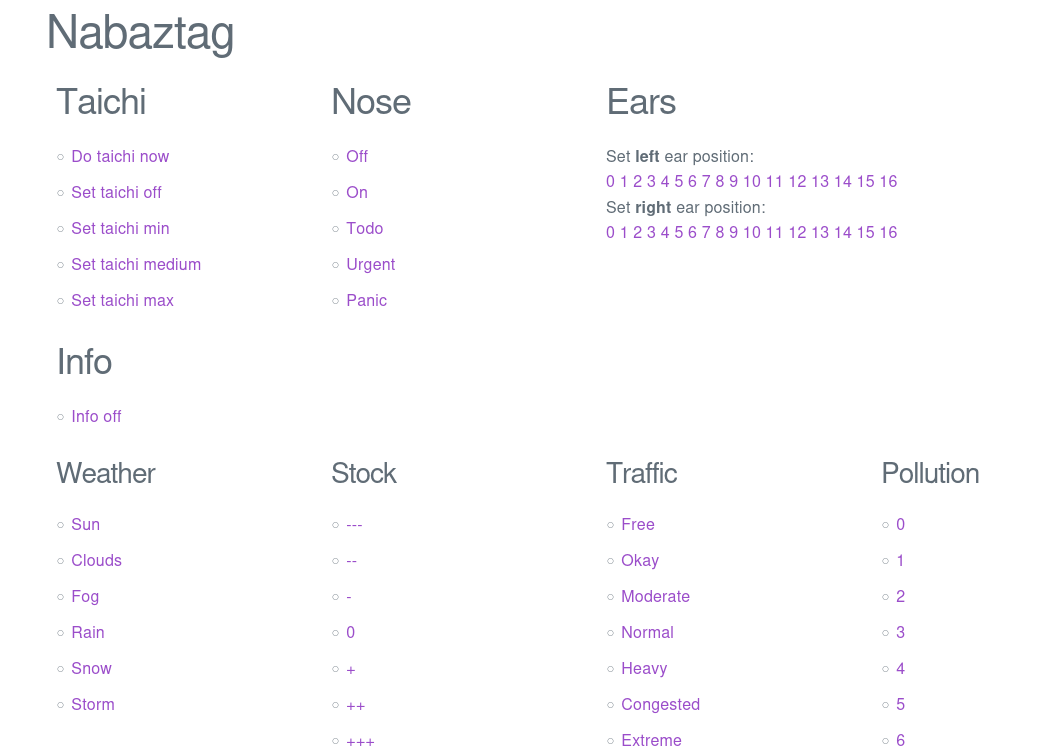
With this firmware, you can connect at http://<YOURNABAZTAGIP>/ and completely control your rabbit with a very simple web interface, as shown in the following screenshot:
The OpenAPI specification is available at http://<YOURNABAZTAGIP>/openapi.json and the Swagger UI at http://andreax79.github.io/ServerlessNabaztag/vl/api/
All the commands can be called with a single HTTP request from an external program/script, example:
$ curl http://nabaztag/wakeup
In examples/check_mail.py, there is a script that turns on the nose when you have unread email.
Configure the rabbit
- Unplug the rabbit, press the button on its head and hold it while you replug your rabbit. When all the lights are blue, you can release the button
- On your computer, connect to the WiFi network created by your rabbit (the name should be Nabaztag<XX>)
- Go to the configuration page at the following address: http://192.168.0.1
- At the bottom of the page, in General Info, change “Violet Platform” to andreax79.github.io/ServerlessNabaztag/vl (without http://)
- Click on Update settings and wait for the rabbit to reboot
- You can now connect to the IP of your rabbit, configure and control it. (Note: if your rabbit IP is assigned with DHCP, you have to discover the IP address. Usually you can check the assigned IP from some page on your router)
Install on your web server (HTTP only)
- Copy all the content from the vl folder on this repository to your web server in a folder named “vl”. This folder contains all the resources needed by the firmware (mp3 files, Forth files, choreographies, HTML, CSS, etc.)
- Unplug the rabbit, press the button on its head and hold it while you replug your rabbit. When all the lights are blue, you can release the button
- On your computer, connect to the WiFi network created by your rabbit (the name should be Nabaztag<XX>)
- Go to the configuration page at the following address: http://192.168.0.1
- At the bottom of the page, in General Info, change “Violet Platform” to the URL of the vl directory (without http://, example: 192.168.0.1/vl)
- Click on Update settings and wait for the rabbit to reboot
- You can now connect to the IP of your rabbit, configure and control it. (Note: if your rabbit IP is assigned with DHCP, you have to discover the IP address. Usually you can check the assigned IP from some page on your router)
Firmware features
- Control the rabbit via HTTP API
- Configure via Web interface
- Simple password protection for Web and Telnet access
- Built-in Forth interpreter accessible from the Web interface and via Telnet
- Fetch the current time from NTP and play the corresponding sound every hour
- Fetch weather and air quality from open-meteo
- Autonomously wake up and go to sleep
- Override the LEDs with custom colors and change the breathing LED color
- Customize LEDs animation patterns
- Respond to ICMP pings
Forth Interpreter
The firmware includes a built-in Forth interpreter that allows you to interactively control and program your Nabaztag. The interpreter provides a powerful scripting environment with access to all rabbit functions.
Accessing the Interpreter
You can access the Forth interpreter in two ways:
- Web Interface: Available at http://<YOURNABAZTAGIP>/
- Telnet: Connect to your Nabaztag via Telnet on port 22
$ telnet 192.168.79.15
Trying 192.168.79.15...
Connected to 192.168.79.15.
Escape character is '^]'.

*** ServerlessNabaztag ***
$Rev: 2025-12-20T07:44:49$

Welcome to the interactive Forth system.

Type 'words' to see available words.
Type 'quit'  to exit the interpreter.

[0] > taichi
[0] >
Available Words
The complete list of available Forth words is documented in vl/words.txt. The interpreter supports standard Forth operations plus Nabaztag-specific commands for controlling ears, playing sounds, and more.
Simple Examples
Here are some basic commands to get you started:
\ Move the left ear forward to position 10
left-ear forward 10 move-ear

\ Move the right ear backward to position 5
right-ear backward 5 move-ear

\ Play a MIDI note (middle C)
60 play-midi

\ Display current ear positions
ears . .

\ Wake up the rabbit
wake-up

\ Put the rabbit to sleep
sleep

\ Display current time
daytime

\ Say something (text-to-speech)
"Hello World" say

\ Override the left LED to red color
"#ff0000" led-left !
Configuration
You can configure the telnet login credentials and other settings by editing the vl/config.forth file. This file contains configuration variables for the username and password.
Most of the Nabaztag’s functionality can be customized by editing the Forth files in the vl folder:
- vl/init.forth - Initialization script
- vl/config.forth - Configuration settings
- vl/consts.forth - Constant definitions
- vl/crontab.forth - Scheduled tasks
- vl/hooks.forth - Event handlers (clicks, RFID, etc.)
- vl/telnet.forth - Telnet server
- vl/weather.forth - Weather and air quality
Development
Please install the following dependencies:
$ sudo apt-get install gcc-multilib g++-multilib
Build the compiler and the simulator:
$ make compiler
Build the firmware
$ make firmware
Start a local web server on port 80 (you need root for this):
$ sudo python3 -m http.server 80
or start local web server on port 8000 and redirect port 80 to 8000 (you need root for the iptables command):
$ sudo iptables -t nat -I PREROUTING -p tcp --dport 80 -j REDIRECT --to-ports 8000
$ python3 -m http.server